How to write a theme?
TIP
Valaxy is fully compatible with the Vite/Vue ecosystem, so you can freely use third-party Vite/Vue plugins when writing themes.
Valaxy themes can be published as source files without pre-compilation. Start with the theme template, then use the examples, directory structure, and extension APIs below to guide development. You can also use the AI theme generator to prepare a design brief and help create a theme.
If you have questions or want to discuss theme development needs, join the "Yun Le Fun" QQ channel or start a GitHub Discussion. For bug reports and specific feature requests, open an Issue. We will continue to document answers to common questions.
Explore more Valaxy themes, plugins, and related projects in the valaxyjs GitHub organization.
Theme Examples
- valaxy-theme-starter: Valaxy theme development template
- valaxy-theme-yun: valaxy-theme-yun, a more complete theme example
- valaxy-theme-press: valaxy-theme-press, the current documentation theme example
Generate a Theme with AI
Turn a visual idea into a runnable, maintainable theme. Install the theme Skill, then use the generator to prepare this design brief for your preferred coding assistant.
This page generates a prompt. It does not call a model or upload your project; use it with your preferred coding assistant.
A theme that starts with you.
Choose a direction, add your ideas, and bring your coding assistant.
Start with a brief
Skill installed? Share this design brief; the Skill supplies the development workflow. Install the theme Skill
Skill or prompt?
Use Skill + design brief for ongoing theme development. The Skill supplies reusable framework contracts, SSR, accessibility and verification guidance. Your brief describes this task: theme name, visual direction, workspace and features. Keep using the same Skill for later iterations and provide only the new requirements.
The generator defaults to Design brief + Skill, without repeating the engineering manual. Choose Standalone prompt if the Skill is not installed or your assistant does not support Skills. Both formats preserve the same design input; switching does not reset the form.
Install the theme authoring Skill
pnpm dlx skills add YunYouJun/valaxy --skill valaxy-themeThe theme Skill covers framework contracts, styles, static builds and package verification. Use it alongside the Valaxy Skill for site configuration, content and MCP.
Start from the official template
pnpm dlx degit valaxyjs/valaxy-theme-starter valaxy-theme-my-blog
cd valaxy-theme-my-blog
pnpm theme:init my-blog --owner your-github-name
pnpm install
pnpm dev
The template separates the distributable theme/ package from its demo/ consumer. The initializer updates package references, the theme name and component prefixes together. pnpm lint and pnpm typecheck are available independently (build first to generate types in a fresh workspace); pnpm check runs all checks; pnpm pack:theme creates an installable archive.
Example: AK UI × Arknights
The Arknights theme adapts AK UI’s industrial geometry, graphite surfaces and yellow actions to a personal blog. It includes real posts, title and tag filters, an article outline, light/dark modes and mobile layouts.
Use this theme: run the source example, install it in an existing blog, configure it and deploy an SSG build under a subdirectory. The updated example uses AK UI 1.1 mobile-menu controllers and verifies keyboard focus, no-JavaScript navigation and reduced motion.
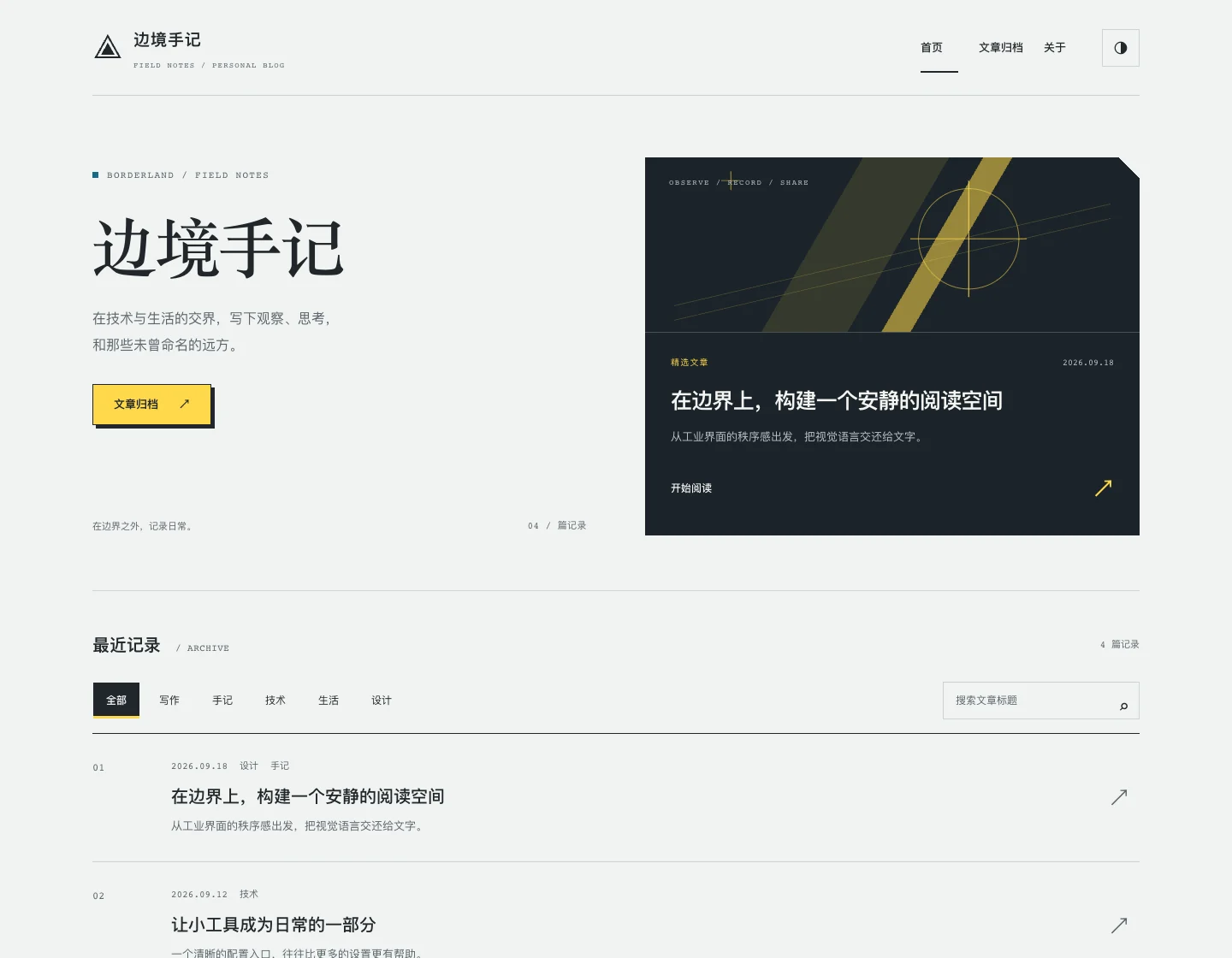
Choose the AK UI / Arknights preset above to create a similar design brief. AK UI supplies CSS Core; Vue components implement the pages and interactions. Posts remain ordinary Markdown. You can also install its design Skill:
pnpm dlx skills add YunYouJun/ak-ui --skill ak-uiThis is an independent, unofficial theme with original graphics and no game assets. Review the design, dependencies and reading experience after generation. Publishing the npm package or deploying a site remains your decision.
Creating a Theme Template
TIP
If you just want to keep things simple and create a blog theme for personal use without publishing, you can directly reference your theme locally.
See demo/custom.
# Use valaxy-theme-starter template
pnpm create valaxy
# choose Theme
Before diving in, let’s first understand the basic structure of a Valaxy theme. It is very similar to a normal user directory structure.
Taking valaxy-theme-yun as an example:
Although it may look like a lot, most of these are optional. You can write only what your theme needs.
App.vue: Theme entry file for mounting global theme componentsREADME.md: Theme documentation (undoubtedly essential 😛)client: Client-side helper functions exposed by the theme to usersindex.ts: Entry file for theme’s client-side helper functions
components: Theme componentsValaxyMain.vue: Theme’s article rendering componentYunSidebar.vue: Theme’s sidebar componentYunSponsor.vue: Theme’s sponsor componentYunWaline.vue: Third-party comment Waline adapter component
composables: Helper Composition APIconfig.ts: Theme configuration filehelper.ts: Theme helper functionsindex.ts: Theme Composition API entry filepost.ts: Theme’s post-related helper functions
docs: Theme documentation (organize and present with your favorite structure!)For customization and Dogfooding purposes, Valaxy’s documentation is built using itself with a documentation theme valaxy-theme-press. If you just want a simple and lightweight documentation site, Vitepress is a good choice. (valaxy-theme-starter may include this example template in the future.)
en-US: English documentationzh-CN: Chinese documentation
features: Theme signature features, functions that don’t depend on Vue Composition API (different fromcomposables)fireworks.ts: Fireworks click effect
layouts: Theme layouts (extend more layouts)default.vue: Default layouthome.vue: Home page layoutlayout.vue: Post list layoutpost.vue: Post layout (posts inpages/posts/folder default topostlayout)tags.vue: Tags layout
locales: Theme multi-language supporten.yml: English language filezh-CN.yml: Chinese language file
node_modules: Theme dependencies (do not commit to repository)node: Theme’s Node-side logicpackage.json: Theme information and dependenciespages: Theme’s default pages (extend more pages)index.vue: Home pagepage: Regular page[page].vue: Post list page, dynamic route, e.g.,/page/2
setup: Theme entry file (can register Vue plugins, etc.)main.ts: Main entry filedefineAppSetup
stores: Theme state managementapp.ts: Global state management file
styles: Theme stylesindex.ts: Theme styles entry file
tsconfig.json: Theme’s TypeScript configurationtypes: Theme type declarationsindex.d.ts: Theme type declarations entry file
unocss.config.ts: Theme’s UnoCSS configurationutils: Theme utility functionsvalaxy.config.ts: Theme configuration file
APIs
We provide an extension function extendMd for you to quickly extend page information.
In the theme’s valaxy.config.ts, you can access each Markdown page’s route, frontmatter data, excerpt, and file path through extendMd, and modify them at build time.
import { defineTheme } from 'valaxy'

export default defineTheme({
  extendMd(ctx) {
    // ctx.route - EditableTreeNode, you can modify route meta
    // ctx.data  - Readonly frontmatter data parsed from markdown
    // ctx.content - Raw markdown content
    // ctx.excerpt - Excerpt content (if exists)
    // ctx.path  - Absolute file path of the markdown file

    // Example: add custom meta to all pages
    ctx.route.addToMeta({
      frontmatter: {
        customField: 'hello from theme',
      },
    })
  },
})
You can also directly extend extendRoute from the vue-router/vite plugin.
https://github.com/posva/unplugin-vue-router/issues/43#issuecomment-1433140464 (now part of vue-router)
import { defineTheme } from 'valaxy'

export default defineTheme({
  router: {
    extendRoute(route) {
      // want to get component absolute paths?
      // const path = route.components.get('default')
      console.log(route)
    },
  },
  extendMd(ctx) {
    console.log(ctx.path)
  },
})import type { EditableTreeNode } from 'vue-router/unplugin'
// provided by valaxy, just as a tip
export interface ValaxyConfig {
vue?: Parameters<typeof Vue>[0]
components?: Parameters<typeof Components>[0]
unocss?: UnoCSSConfig
pages?: Parameters<typeof Pages>[0]
extendMd?: (ctx: {
route: EditableTreeNode
data: Readonly<Record<string, any>>
excerpt?: string
path: string
}) => void
}TIP
data is parsed from Markdown frontmatter and is read-only. It will be merged into route.meta.frontmatter.
Client
Toggle Dark
The following variables are stored in global state, which you can get through useAppStore.
isDark: Whether dark mode is enabledthemeColor: Theme color (followsisDark)toggleDark: Toggle dark modetoggleDarkWithTransition: Toggle dark mode with transition
<script lang="ts" setup>
import { useAppStore } from 'valaxy'

const appStore = useAppStore()
</script>

<template>
  <button class="yun-icon-btn" @click="app.toggleDarkWithTransition">
    <div i="ri-sun-line dark:ri-moon-line" />
  </button>
</template>
You can configure dark mode options through
themeConfig.valaxyDarkOptions.
Default Theme Config.valaxyDarkOptions
import type { UseDarkOptions } from '@vueuse/core'
// eslint-disable-next-line ts/no-namespace
export namespace DefaultTheme {
export interface Config {
valaxyDarkOptions?: {
/**
* Options for `useDark`
* disableTransition default is `true`
* Its options are not computed, init when loaded.
* @see https://vueuse.org/core/useDark
* @url https://paco.me/writing/disable-theme-transitions
*
* @zh `useDark` 的选项
* disableTransition 默认为 `true`,不会进行渐变过渡,这是 VueUse 的默认行为
*/
useDarkOptions?: UseDarkOptions
/**
* Enable circle transition when toggling dark mode
* Then use `toggleDarkWithTransition` instead of `toggleDark`
* @zh 启用圆形过渡切换暗黑模式
*/
circleTransition?: boolean
Node
Hooks
Start Writing
App.vue
Your entry file
For example, I want to add a global Loading page for the theme.
You can import the global state useAppStore from valaxy and use showLoading to implement this.
You can also use your own global state management. See Global State Management.
<script lang="ts" setup>
import { useHead } from '@unhead/vue'
import { useAppStore } from 'valaxy'
import { onMounted } from 'vue'

// ...

const app = useAppStore()
onMounted(() => {
  app.showLoading = false
})
</script>

<template>
  <!-- ... -->
  <!-- Add Loading component, components/YunLoading.vue -->
  <!-- https://github.com/YunYouJun/valaxy/blob/main/packages/valaxy-theme-yun/components/YunLoading.vue -->
  <Transition name="fade">
    <YunLoading v-if="app.showLoading" />
  </Transition>
</template>
TIP
- You can completely override the root component through the
ValaxyApp.vuecomponent to achieve deeper customization needs. (Completely customized by you, no longer default handling such as mountingrouter-view, etc.)
ValaxyMain
You need to customize a ValaxyMain component to define the article rendering part of the theme.
You can get
frontmatterandpageDatafrom thepropsofValaxyMain.
<script lang="ts" setup>
import type { PageData, Post } from 'valaxy'

defineProps<{
  frontmatter: Post
  data?: PageData
}>()
</script>

<template>
  <main>
    <slot name="main-content">
      <ValaxyMd :frontmatter="frontmatter">
        <slot name="main-content-md" />
        <slot />
      </ValaxyMd>
    </slot>
  </main>
</template>
See ValaxyMain.vue | valaxy-theme-yun for an example.
Styles
Import Default Styles
Valaxy provides some default styles that you need to import in your theme.
For example, create valaxy-theme-yun/setup/main.ts:
import { defineAppSetup, scrollTo } from 'valaxy'
import { nextTick } from 'vue'

// Import valaxy common styles
import 'valaxy/client/styles/common/index.scss'

// You can also import on demand
// common
import 'valaxy/client/styles/common/code.scss'
import 'valaxy/client/styles/common/hamburger.scss'
import 'valaxy/client/styles/common/transition.scss'
// Markdown Style
import 'valaxy/client/styles/common/markdown.scss'

export default defineAppSetup((ctx) => {
  const { router, isClient } = ctx
  if (!isClient)
    return

  router.afterEach((to, from) => {
    if (to.path !== from.path)
      return

    nextTick(() => {
      scrollTo(document.body, to.hash, {
        smooth: true,
      })
    })
  })
})
Markdown Styles
Markdown styles are part of how a theme presents article content and need to be customized by the theme.
You can refer to how valaxy-theme-press customizes its Markdown theme. See styles/markdown.scss.
If you want to use common default styles first (and customize them later), you can directly use star-markdown-css. See valaxy-theme-yun/styles for usage.
NProgress Progress Bar
Built-in basic nprogress styles are included. You can customize them by overriding the default nprogress styles:
#nprogress {
  pointer-events: none;

  .bar {
    background: var(--va-c-primary);
    opacity: 0.75;
    position: fixed;
    z-index: 1024;
    top: 0;
    left: 0;
    width: 100%;
    height: 2px;
  }
}
Features
API
You can also use Valaxy’s built-in APIs to quickly implement related features.
Get User’s Valaxy Config
You can get the user’s Valaxy configuration through the built-in useValaxyConfig.
TIP
This configuration corresponds to the user’s settings in valaxy.config.ts, but it is only used on the client side, so it does not include Node-side configurations (such as vite, etc.).
import { useSiteConfig, useValaxyConfig } from 'valaxy'
import { useThemeConfig } from 'valaxy-theme-custom'

const config = useValaxyConfig()
// site.config.ts or config.value.siteConfig
const siteConfig = useSiteConfig()
// theme.config.ts or config.value.themeConfig
const themeConfig = useThemeConfig()
Provide Typed useThemeConfig
You can provide a theme-specific useThemeConfig function so that you and your users can get type-constrained configuration.
// custom your theme type
import type { YunTheme } from '../types'
import { useValaxyConfig } from 'valaxy'
/**
 * getThemeConfig
 */
export function useThemeConfig<ThemeConfig = YunTheme.Config>() {
  const config = useValaxyConfig<ThemeConfig>()
  return computed(() => config!.value.themeConfig)
}<script lang="ts" setup>
import { useThemeConfig } from 'valaxy-theme-custom'
const themeConfig = useThemeConfig()
</script>Get Post List
There are two ways to get the post list.
usePostList: Get the post list (not recommended)
import { usePostList } from 'valaxy'

const postList = usePostList()useSiteStore: Get global site information (recommended)
const site = useSiteStore()

// site.postList
The difference between the two is that usePostList is a basic function that fetches all posts and re-filters them on every call, while useSiteStore calls usePostList once and caches the post list in global state for subsequent use.
(Additionally, useSiteStore also implements hot-updating the list when saving posts, e.g., updating the title.)
valaxy/packages/valaxy-theme-yun/components/YunPostList.vue is an example of using
useSiteStoreto display the post list. For pagination, see valaxy-theme-yun/pages/page/[page].vue and valaxy-theme-yun/components/YunPostList.vue.
Get Post Categories and Tags
After getting the post list, each post in site.postList has categories and tags properties.
You can also use useCategories and useTags to get all categories and tags, which include the mapping to their corresponding posts.
import { useCategories, useTags } from 'valaxy'

const categories = useCategories()
const tags = useTags()- valaxy/packages/valaxy-theme-yun/layouts/categories.vue is an example of using
useCategoriesto display post categories. - valaxy/packages/valaxy-theme-yun/layouts/tags.vue is an example of using
useTagsto display post tags. (useYunTagsis the theme’s wrapper arounduseTags.)
In
useTags,tagsis an object where the key is the tag name and the value is the corresponding post list.useCategoriesaccepts acategoryparameter (useCategories('aaa')) to get the post list for a specific category.
Get Front-matter
You can get the current page’s Front-matter through useFrontmatter.
For example:
<script lang="ts" setup>
import { useFrontmatter } from 'valaxy'

const fm = useFrontmatter()
</script>

<template>
  <h1>{{ fm.title }}</h1>
</template>
Global State Management
You can use Pinia (built into Valaxy) to create your own global state and use it later.
import { acceptHMRUpdate, defineStore } from 'pinia'

// custom your theme name
export const useYunAppStore = defineStore('yun-app', () => {
  // global cache for yun

  return {}
})

if (import.meta.hot)
import.meta.hot.accept(acceptHMRUpdate(useYunAppStore, import.meta.hot))// where you want to use
// components/YunExample.vue
import { useYunAppStore } from '../stores/app'
const yun = useYunAppStore()Previous/Next Post
Navigation for switching between the previous and next post is typically placed at the bottom of an article.
You can implement it yourself using siteStore.postList, or use Valaxy’s built-in usePrevNext.
import { usePrevNext } from 'valaxy'

const [prev, next] = usePrevNext()
// prev/next type is PostFrontMatter
// prev.title prev.path
Table of Contents
If you want to quickly implement a table of contents, Valaxy provides a built-in hook function useOutline.
You can use it to quickly get the headers (outline information) and corresponding handleClick event for article pages. For example:
<script setup lang="ts">
import { useOutline } from 'valaxy'

const { headers, handleClick } = useOutline()
</script>

<template>
  <nav aria-labelledby="doc-outline-aria-label">
    <span id="doc-outline-aria-label" class="visually-hidden">
      Table of Contents
    </span>

    <PressOutlineItem
      class="va-toc relative z-1 css-i18n-toc"
      :headers="headers"
      :on-click="handleClick"
      root
    />
  </nav>
</template>
For more details, see PressOutline | valaxy-theme-press.
Referencing Static Assets
When your theme needs to include some static assets (e.g., images), you can use relative imports. (This also applies in scss style files.)
For example, when assets and components are in the same directory:
├── components
│   └── ValaxyLogo.vue
└── assets
    └── images
└── valaxy-logo.png<script lang="ts" setup>
import valaxyLogoPng from '../assets/images/valaxy-logo.png'
</script>
<template>
<img max-w="50" m="auto" :src="valaxyLogoPng" alt="Valaxy Logo" z="1">
</template>
<style scoped>
.test-image {
background-image: url('../assets/images/valaxy-logo.png');
}
</style>Third Party Plugin
Implement Comments
As a blog, users typically have commenting needs.
Due to the variety of comment systems, theme developers like Hexo often need to repeatedly implement multiple comment systems on the theme side. This is obviously tedious.
Valaxy decided to centrally provide various packaged comment components and helper functions through plugins.
For example, theme developers can use valaxy-addon-waline to quickly integrate the Waline comment system. Users can use the same configuration to roam between different themes.
For integration, see valaxy-addon-waline.
Performance Optimization
Add Dep Pre-bundling optimizeDeps
To improve the loading performance of subsequent pages, Vite bundles ESM dependencies with many internal modules into a single module. If your theme depends on some large ESM packages, you can pre-build these dependencies by adding the optimizeDeps option.
dayjshas been pre-built by default, you don’t need to add it again. Why use dayjs instead of date-fns?
import { defineTheme } from 'valaxy'

export default defineTheme({
  vite: {
    optimizeDeps: {
      include: ['lodash-es'],
    },
  }
})
Using Addon Config in Themes
When your theme integrates with optional addons (e.g., Algolia search, Waline comments), you can use useAddonConfig from valaxy to read addon options without adding a hard dependency on the addon package.
<script lang="ts" setup>
import type { AlgoliaSearchOptions } from '../types/algolia'
import { useAddonConfig } from 'valaxy'

const algolia = useAddonConfig<AlgoliaSearchOptions>('valaxy-addon-algolia')
// algolia.value is undefined when the addon is not installed
</script>
This avoids the previous pattern of using dynamic import('valaxy-addon-xxx') with .then() / .catch(), which was error-prone and not reactive.
Remind Users with Special Needs to Install Third-party Plugins
If your theme adapts to multiple addons, but not all users need to install them. Such as comment plugins:
valaxy-addon-walinevalaxy-addon-twikoo
When a user hasn’t actively installed the corresponding addon (i.e., the addon doesn’t exist), it will default to redirecting to an empty function.
Therefore, if a plugin is not required, please remind users who want to use this feature to install the corresponding plugin in the theme documentation.
To Be Continued.